Monday, August 31, 2009

How i wish i could watch Lotus Knows videos!

I was excited about the prospect of seeing the Lotus Knows videos when they were submitted, but it appears i will not. In an email response today i got this information

"Please note that your video will not appear on the Entries Page of the www.doyouknowlotus.com site. Due to the short time frame, and nature of the Video Blitz, we've chosen to keep the videos under wraps until they've been reviewed and the Lotus Knows landing page goes live featuring the chosen videos."


Well, i guess i will have to find other ways to spend my lunch hour....

Wednesday, August 26, 2009

When my dad first showed me Lotus Notes

My dad and i always seem to enjoy many of the same things. We like to play golf, go fishing, and play with any kind of gadget we can find. We were sitting around talking last week about all kinds of technology related stuff and i remembered when i first saw Lotus Notes.

I was pretty young at the time, maybe middle school, so think late 80's early 90's. My dad was a manger for Texaco, and he had a laptop that he brought home from work. We were both very interested in computers, i remember our family having a TI, an x86, 286, 486 etc. So when he got new stuff at work he would show me what they used, and how it helped them to do whatever they were trying to accomplish. So one day he showed me this software called Lotus Notes. It had a tabbed interface and workspace, probably version 2 or 3, though he tells me he remembers version 1. It had the icons scattered across the workspace, and he would open one up and tell what they used it for tracking and how it helped them communicate about this or that, little did i know i would be using the SAME icons many years later, please update them! He seemed genuinely excited about the possibilities the software had. He could open it up at home and replicate it at work the next day. Strange, i had seen my future and did not even know it!

Fast forward many years later, i graduated form college and got my first job with an IBM business partner which started my career with Lotus Notes and similar products. So i guess that makes me a second generation Lotus Notes user, i wonder how many others out there have similar experiences.

At that time my Dad was managing Knowledge management at Texaco, and talked about team rooms and people working together across great distances, so i showed him this brand new product called QuickPlace. Texaco started using it shortly after, so whoever got the sale from that purchase - your welcome!

Now i have been administrating and developing with Notes for about 10 years, and my son who is three and a half will see this software in the near future, with me saying look at this - see how useful it is. This saves or company x many hours per week. He will be the 3rd generation to see it, and one day may use it in his work.... who knows what will happen in 20 years.

My favorite Notes Client 8.5.1 feature so far! I have been waiting for it since 8.0.

IBM Lotus Notes/Domino and Lotus Notes Traveler 8.5.1 is prerelease code and there are no guarantees from IBM that the functionality presented or discussed will be in the final shipping product.


Oh yeah, its in the designer client as well.

No more text properties box for me!!

Friday, July 31, 2009

A Preview of my iPhone web app for the Journal/Notebook

It is almost complete, works much in the same fashion as the app for the To Do’s.  Here are some preliminary screen shots.  If you see something that needs to be added or improved please let me know, thanks.

photo 4 photo

photo 5 photo 2 photo 3

Wednesday, July 29, 2009

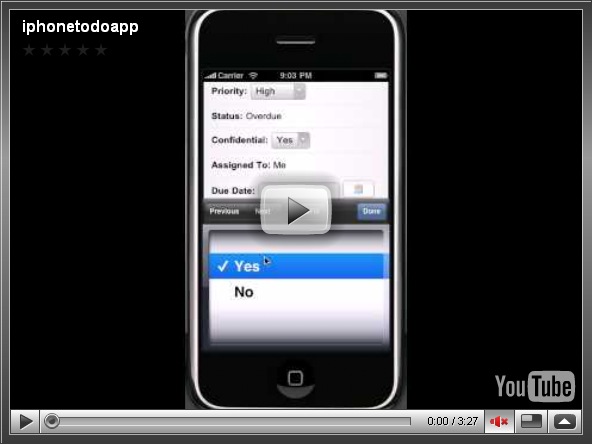
iPhone Lotus Notes “To Do” web app video

Here is the video of the To Do app. It was recorded on the iPhone simulator on my wife's Mac. I didn't investigate how to turn the mic off with jing, and it doesn't refresh as well as i would like, but hey it was free. You can hear my daughter playing with her rattle in the background, and some annoying mighty mouse clicks... but other than that i think it shows the UI pretty well.


Tuesday, July 28, 2009

Manage your Lotus Notes To Do’s on the iPhone

The iPhone is great, especially with Lotus Notes Traveler 8.5.1, but is missing a few items that the blackberry includes.  One of these items is the To Do  functionality.  Seeing a need for people to manage their to do’s on the iPhone, i created an Xpage “To Do” app that runs in its own process when saved to the home page.  I have seen different apps that let you read or view your to do’s, but they have limited functionality, you could not edit them, create them, or view attachments.

To avoid the Apple app update submittal headache, I think a web app was the right way to go.  Updates can be done by replacing the design of the database, or making a few changes, then everyone gets the changes.

All to do’s are stored in the mail file, and i didn't want others to have  modify their mail file templates to use this new functionality.  The beauty of Xpages is that i can compute the data sources to the the users mail file who is logged in.  So to install this application, all you need is a Domino 8.5.1 server, and you simply drop the database in a directory, and send a web link to the iPhone.  Who-ever logs in gets their to do’s, the mail file doesn't even have to be on the same server, except if they want to view attachments.

If you would like more information about this product please email me, thanks

Update here is a new post with video - Video 

Now for some screen shots(Video coming later this evening)

Home Screen

photo 2

Loading Page

 photo 3

Application home screen

photo 4 photo12 photo14

Drop Down combo box for View By: and Status:

photo11 photo 5

The To Do Form, notice attachments at the bottom

 photo 2 photo 3photo photo 4

An Attachment, you can scroll around to see it, also planning on adding a button to open in Safari.

photo 5

Friday, July 17, 2009

Xpages: Part 3, making an CRM app iPhone Friendly – Making it look like a native app

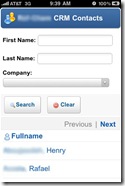
The first thing you need to do to make your Xpage application look like a native iPhone app is to put all the parts(view, form, etc.) into 1 Xpage.  I did this with two panels, one is hidden while the other is showing.  In the first panel, which is set to display:none by default, is the contact form.  The other panel which is visible by default is the view and search function.

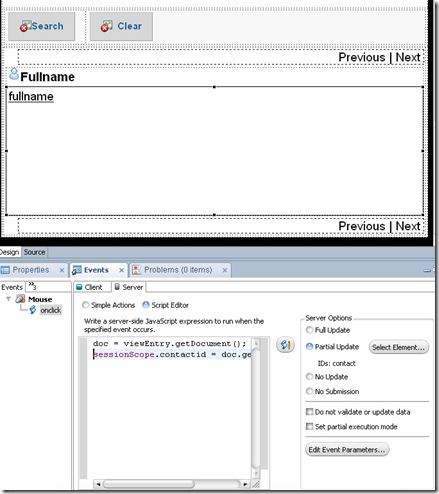
Configure the links in the view to set the document(data source for the contact panel) to the universal docid  by using the columns onClick event on the events tab. Set it to partial update the contact panel to receive the information from the document data source. On the client side js in the onClick event, set the panel with the search view in it to display:none, then set the contact panel to display:block.
dde1

Then create a back button on the contact form that hides the contact panel, and displays the search view panel.

The reason you need to put everything on one page and use Ajax refresh is because of the next step, also it is much much faster then changing pages.  Add this meta tag to the Xpage.

<meta name="apple-mobile-web-app-capable" content="yes" />

When a user bookmarks a your web page with this meta tag on the iPhone home screen, it will open in its own safari app process, it will not show the location bar or the bottom nav bar.  If you click on a link to another web page it will open it in a normal Safari window and take you away from the app, ruining your appearance of it being a native app.

Another meta tag that really makes a difference is:

<meta name="apple-mobile-web-app-status-bar-style" content="black" />

photo6 photo7

This will set the top bar with “ATT and time” to be black when the app is opened.   

Now we want a custom icon on the iPhone home page, and a startup image too.  For this we add two links:

<link rel="apple-touch-icon" href=”/icon.png” />
<link rel="apple-touch-startup-image" href="/startup.png" />

Notice the CRM app icon on the desktop, then look at the startup “splash screen” image.

photo photo 4

The start up image comes up immediately, then waits for your page to open.  I suggest making your own Domcfg.nsf login form using the ultralite login subform as a start, then make the buttons and fields allot bigger.  i also found out that sometimes this replaces the iPhone home icon with the ultralight login image, so fix that as well, every app will have to have a custom login form.  I also added the ability to remember the password, not just the username.  You can search the web to find the correct dimensions for these pictures.

login

All that is left is to put in some nice webkit transitions when you hide and then display the panels.  I like to first fade out the current panel, after the fade out has occurred - set it to display:none, Set the next panel to display:block, then fade that panel in.  Most of this can be done with CSS, i will blog on this later.  You can also do the card flip or any webkit transition you would like.
photo photo 4 login photo6