Hotfix will be available Monday. It may have something to do with your spam gateway device. We use Ironmail. This cant be good.....
Saturday, August 28, 2010


Wednesday, August 25, 2010
Xpages: Validation for a field, hopes this helps someone
Today i needed to do some validation on an Xpages form.
The scenario
I had a field, it had typeahead enabled on an Xpage. This view has 6000 documents so a combo box was out of the question. I didnt really want to do a pick list either since most people know the number they want in the first place. But i needed a way to figure out if the value in the field existed in the view.
So i looked at adding a custom validator, couldn't seem to make that work. So i looked on the wiki and a few other places and discovered this. Create a validateExpression validator.

In the expression field you need to add your code to calculate to true or false. Syntax should be something like
return var1 == var2
Mine looked like
account1 = @Trim(@Text(document3.getItemValueString('job')));
chargetype = document3.getItemValueString('jobaccount');
db1 = new Array("notes1", "Applications\\viewpoint.nsf")
var iffound = ""
if(chargetype == 'Job')
{ iffound = @Trim(@Text(@DbLookup(db1,"Project Import",account1,1)));
return account1 == iffound
}
else
{return (@IsMember(account1, @DbColumn(db1,"Accounts7",1))!= 0)
}
Then here is the part i didn't get from the wiki post, You need to add a DisplayError control next to the field you are validating. Then set that displayerror to show error messages for that field you are validating. It will not pop up like the simple can not be 0 or can not be empty messages you get from the default validators.


The scenario
I had a field, it had typeahead enabled on an Xpage. This view has 6000 documents so a combo box was out of the question. I didnt really want to do a pick list either since most people know the number they want in the first place. But i needed a way to figure out if the value in the field existed in the view.
So i looked at adding a custom validator, couldn't seem to make that work. So i looked on the wiki and a few other places and discovered this. Create a validateExpression validator.

In the expression field you need to add your code to calculate to true or false. Syntax should be something like
return var1 == var2
Mine looked like
account1 = @Trim(@Text(document3.getItemValueString('job')));
chargetype = document3.getItemValueString('jobaccount');
db1 = new Array("notes1", "Applications\\viewpoint.nsf")
var iffound = ""
if(chargetype == 'Job')
{ iffound = @Trim(@Text(@DbLookup(db1,"Project Import",account1,1)));
return account1 == iffound
}
else
{return (@IsMember(account1, @DbColumn(db1,"Accounts7",1))!= 0)
}
Then here is the part i didn't get from the wiki post, You need to add a DisplayError control next to the field you are validating. Then set that displayerror to show error messages for that field you are validating. It will not pop up like the simple can not be 0 or can not be empty messages you get from the default validators.


Anyways I hope this helps someone else.
Monday, August 23, 2010
Video: My Tasks (ITANA) V4.0 for iPhone and Android delivers offline read/write via HTML5 and IBM Lotus Domino 8.5.2 XPages
ITANA V4.0 has been completely rewritten to work offline for editing and adding tasks. As a great side benefit, ITANA opens quickly(sub 2 seconds) and moving between tasks is very very fast(sub second). Since this update requires Domino 8.5.2(for the cache manifest), it will be released shortly after it is available later this month. Please let me know what you think
Thursday, August 12, 2010
My Tasks (ITANA) V4.0 for iPhone and Android delivers offline read/write via HTML5 and IBM Lotus Domino 8.5.2 XPages
ITANA V4.0 has been completely rewritten to work offline for editing and adding tasks. As a great side benefit, ITANA opens quickly(sub 2 seconds) and moving between tasks is very very fast(sub second). Here are a few screen shots, notice that they were taken from airplane mode(offline for you non iPhone users). Since this update requires Domino 8.5.2(for the cache manifest), it will be released shortly after it is available later this month. Video will be posted in the next few days. Please let me know what you think


Thursday, July 22, 2010
xpages: In an effort to make mass emails from IBM less sucky looking
Since i complained about how bad the IBM emails from supoort looked, i decided to make an easy way for people to create html emails.
I created a simple xpages application where you paste in your html(may i suggest something based on OneUI) into a field, preview it, and then send it to yourself as an html email( so you can then forward it to whoever), It took 30 minutes.

The Xpage source Code :
<xp:this.data>
<xp:dominoDocument var="document1" formName="main"></xp:dominoDocument>
</xp:this.data>
<xp:table style="width:100.0%">
<xp:tr>
<xp:td>
<xp:button value="Close" id="button4"><xp:eventHandler event="onclick" submit="true" refreshMode="complete">
<xp:this.action>
<xp:openPage name="/view.xsp"></xp:openPage>
</xp:this.action></xp:eventHandler></xp:button>
<xp:button id="button2">
<xp:this.value><![CDATA[Save & Close]]></xp:this.value>
<xp:eventHandler event="onclick" submit="true" refreshMode="complete">
<xp:this.action>
<xp:actionGroup>
<xp:saveDocument></xp:saveDocument>
<xp:openPage name="/view.xsp"></xp:openPage>
</xp:actionGroup>
</xp:this.action></xp:eventHandler></xp:button>
<xp:button id="button3" value="Send"><xp:eventHandler event="onclick" submit="true" refreshMode="complete">
<xp:this.action>
<xp:executeScript>
<xp:this.script><![CDATA[#{javascript:
doc1 = database.createDocument()
doc1.appendItemValue("Form","Memo")
var3 = document1.getItemValueString('html')
body = doc1.createMIMEEntity()
subject = body.createHeader("Subject")
subject.setHeaderVal(document1.getItemValueString('subject'))
stream = session.createStream()
stream.writeText(var3)
body.setContentFromText(stream, "text/html; charset=iso-8859-1", 0)
doc1.appendItemValue("SendTo", document1.getItemValueString('creator'))
doc1.send()
}]]></xp:this.script>
</xp:executeScript>
</xp:this.action></xp:eventHandler></xp:button>
</xp:td>
</xp:tr>
</xp:table>
<xp:br></xp:br>
<xp:label value="Mail To:" id="label3" style="font-weight:bold"></xp:label>
<xp:br></xp:br>
<xp:inputText id="inputText1" value="#{document1.creator}" disabled="true"><xp:this.defaultValue><![CDATA[#{javascript:@Name('[CN]', session.getEffectiveUserName())}]]></xp:this.defaultValue></xp:inputText>
<xp:br></xp:br>
<xp:br></xp:br>
<xp:label value="Subject" id="label2" style="font-weight:bold"></xp:label>
<xp:br></xp:br>
<xp:inputText id="inputText2" style="width:400px" value="#{document1.subject}"></xp:inputText>
<xp:br></xp:br>
<xp:br></xp:br>
<xp:label value="Paste in HTML" id="label1" style="font-weight:bold"></xp:label>
<xp:br></xp:br>
<xp:inputTextarea id="inputTextarea1"
style="width:610.0px;height:326.0px" value="#{document1.html}">
</xp:inputTextarea>
<xp:br></xp:br>
<xp:br></xp:br>
<xp:button value="Refresh Preview" id="button1">
<xp:eventHandler event="onclick" submit="true"
refreshMode="complete">
</xp:eventHandler></xp:button>
<xp:br></xp:br>
<xp:br></xp:br>
<xp:label value="Preview" id="label4" style="font-weight:bold"></xp:label><xp:br></xp:br>__________________________________________________________________________________________________
<xp:br></xp:br>
<xp:br></xp:br>
<xp:text escape="false" id="computedField1"><xp:this.value><![CDATA[#{javascript:'<div id = "test me">' + document1.getItemValueString('html')+ '</div>'}]]></xp:this.value></xp:text></xp:view>
I created a simple xpages application where you paste in your html(may i suggest something based on OneUI) into a field, preview it, and then send it to yourself as an html email( so you can then forward it to whoever), It took 30 minutes.
Here is the form, i copied the source html from planet lotus and pasted into the html field. Of course not all images are full paths, so they are broken, but could be fixed easily.

The Xpage source Code :
<?xml version="1.0" encoding="UTF-8"?><xp:view xmlns:xp="http://www.ibm.com/xsp/core" style="padding-left:20px;padding-right:20px;padding-top:10px">
<xp:this.data>
<xp:dominoDocument var="document1" formName="main"></xp:dominoDocument>
</xp:this.data>
<xp:table style="width:100.0%">
<xp:tr>
<xp:td>
<xp:button value="Close" id="button4"><xp:eventHandler event="onclick" submit="true" refreshMode="complete">
<xp:this.action>
<xp:openPage name="/view.xsp"></xp:openPage>
</xp:this.action></xp:eventHandler></xp:button>
<xp:button id="button2">
<xp:this.value><![CDATA[Save & Close]]></xp:this.value>
<xp:eventHandler event="onclick" submit="true" refreshMode="complete">
<xp:this.action>
<xp:actionGroup>
<xp:saveDocument></xp:saveDocument>
<xp:openPage name="/view.xsp"></xp:openPage>
</xp:actionGroup>
</xp:this.action></xp:eventHandler></xp:button>
<xp:button id="button3" value="Send"><xp:eventHandler event="onclick" submit="true" refreshMode="complete">
<xp:this.action>
<xp:executeScript>
<xp:this.script><![CDATA[#{javascript:
doc1 = database.createDocument()
doc1.appendItemValue("Form","Memo")
var3 = document1.getItemValueString('html')
body = doc1.createMIMEEntity()
subject = body.createHeader("Subject")
subject.setHeaderVal(document1.getItemValueString('subject'))
stream = session.createStream()
stream.writeText(var3)
body.setContentFromText(stream, "text/html; charset=iso-8859-1", 0)
doc1.appendItemValue("SendTo", document1.getItemValueString('creator'))
doc1.send()
}]]></xp:this.script>
</xp:executeScript>
</xp:this.action></xp:eventHandler></xp:button>
</xp:td>
</xp:tr>
</xp:table>
<xp:br></xp:br>
<xp:label value="Mail To:" id="label3" style="font-weight:bold"></xp:label>
<xp:br></xp:br>
<xp:inputText id="inputText1" value="#{document1.creator}" disabled="true"><xp:this.defaultValue><![CDATA[#{javascript:@Name('[CN]', session.getEffectiveUserName())}]]></xp:this.defaultValue></xp:inputText>
<xp:br></xp:br>
<xp:br></xp:br>
<xp:label value="Subject" id="label2" style="font-weight:bold"></xp:label>
<xp:br></xp:br>
<xp:inputText id="inputText2" style="width:400px" value="#{document1.subject}"></xp:inputText>
<xp:br></xp:br>
<xp:br></xp:br>
<xp:label value="Paste in HTML" id="label1" style="font-weight:bold"></xp:label>
<xp:br></xp:br>
<xp:inputTextarea id="inputTextarea1"
style="width:610.0px;height:326.0px" value="#{document1.html}">
</xp:inputTextarea>
<xp:br></xp:br>
<xp:br></xp:br>
<xp:button value="Refresh Preview" id="button1">
<xp:eventHandler event="onclick" submit="true"
refreshMode="complete">
</xp:eventHandler></xp:button>
<xp:br></xp:br>
<xp:br></xp:br>
<xp:label value="Preview" id="label4" style="font-weight:bold"></xp:label><xp:br></xp:br>__________________________________________________________________________________________________
<xp:br></xp:br>
<xp:br></xp:br>
<xp:text escape="false" id="computedField1"><xp:this.value><![CDATA[#{javascript:'<div id = "test me">' + document1.getItemValueString('html')+ '</div>'}]]></xp:this.value></xp:text></xp:view>
Tuesday, July 20, 2010
Why customers think Lotus is Legacy Software!
because they get emails like this from IBM about there products
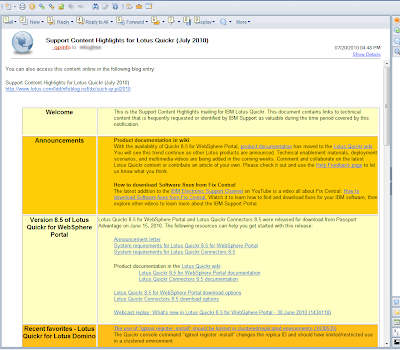
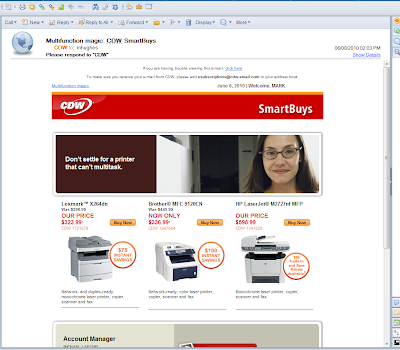
Notice the 1995 era html table
Now here is an example from cdw, not the greatest but not bad either
Tuesday, July 6, 2010
New Blog Series - Taking Notes data offline(Add, Delete, Change) - HTML5
I am starting this new blog series with the intent of showing how to take Lotus Notes data offline on mobile devices, and have them "Replicate" back to the server sending and receiving any changes that have been made.

For this example i will use the Lotus Notes Journal/Notebook or whatever we are calling it these days, but we will not modify that template. Instead we will create a new database that will act as a proxy on the users behalf of locating and "Replicating" the journal file for the user who is logged in. It will store the data locally on the mobile device in a SQLite database.
When i am finished with this project my intent is to post the resulting code on OpenNTF.
So one caveat to begin with, and it really sucks, You must have Domino 8.5.2 beta to make this work. We need to use the cache manifest file which is an upcoming feature in 8.5.2.
Here is a link to the default database, there is way too much formatting, and that is not what this blog series is about.
This database contains an xpage, that is formatted really for any device. It will size to whatever size you need it. The xpage name is MyJournal.xsp. BTW use Google Chrome or Safari for correct rendering.

In the next post i will show how we will get our data from the journal file.
Subscribe to:
Posts (Atom)